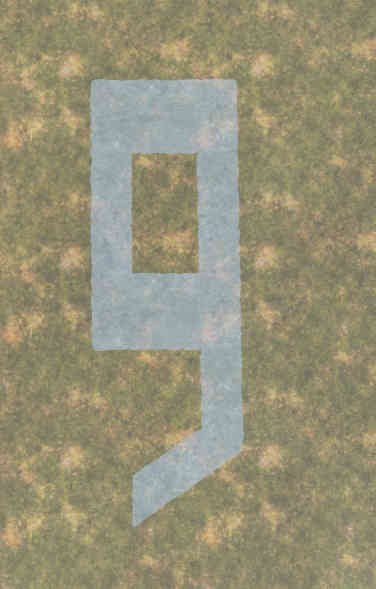
Overview
decal_runway_num9.p3d
Preview courtesy of Sam's Object Finder
LODs
2
Vertices
347
Faces
171
Textures
1
Materials
1
Size (X × Y × Z)
3.072 × 0.000 × 9.042 m

ODOL v54 · 11,214 bytes · Skeleton bones: 0 · Sections: 0

ODOL Flags 33

Size

size_x
3.072 m
size_y
0.000 m
size_z
9.042 m

Flags

autocenter
1
lockautocenter
0
canocclude
0
canbeoccluded
1
disablecover
1
forcenotalpha
0
prefershadowvolume
0
allowanimation
1
canblend
0
isfrequent
0

Model

viewdensity
-10
boundingsphere
4.730262756
geometrysphere
4.730262756
sbsource
Visual
shadowoffset
minshadow
0

Mass

mass
0
massreciprocal
10000000000
armor
200
armorreciprocal
0.005

Map

maptype
22
map
hide

Bounds

bboxminposition
-1.535834432, 0.001, -4.520922184
bboxmaxposition
1.535834432, 0.001, 4.520922184
bboxminvisual
-1.535834432, 0.001, -4.520922184
bboxmaxvisual
1.535834432, 0.001, 4.520922184

Centers

boundingcenter
-0.000361323, 0, 0.020922661
geometrycenter
0, 0, 0
centerofmass
0, 0, 0
aimingcenter
0, 0, 0
Level of Detail 2
0.000 335 verts 164 faces 1 tex
Resolution
0
Vertices
335
Faces
164

Named selections (1)

  • rw_num9

Textures

  • dz\structures\roads\decals\data\decal_runway_plaster_bare_ca.paa

Materials

  • dz\structures\roads\decals\data\decal_runway_plaster_bare.rvmat
1.000 12 verts 7 faces 1 tex
Resolution
1
Vertices
12
Faces
7

Named selections (1)

  • rw_num9

Textures

  • dz\structures\roads\decals\data\decal_runway_plaster_bare_ca.paa

Materials

  • dz\structures\roads\decals\data\decal_runway_plaster_bare.rvmat
model.cfg
class CfgModels
{
	class Default
	{
		Sections[] = {};
		SectionsInherit = "";
		SkeletonName = "";
	};
	class Decal_Runway_Num9: Default
	{
	};
};
CfgSkeletons 0

No SkeletonBones in model.cfg.

CfgModels · Decal_Runway_Num9 0

No Sections in model.cfg.

Textures 1
  • dz\structures\roads\decals\data\decal_runway_plaster_bare_ca.paa
Materials 1
  • dz\structures\roads\decals\data\decal_runway_plaster_bare.rvmat

How to view in 3D

View the full in-game model (all LODs, materials, and selections) in Object Builder and Buldozer from DayZ Tools.

Add a proxy in Object Builder

  1. Open Object Builder from DayZ Tools.
  2. File → New to start a blank map (or open a map you already use for previews).
  3. Create → Proxy
  4. Enter the model path:
    \dz\structures\roads\decals\decal_runway_num9.p3d
  5. Confirm — the proxy appears in the scene. Select it and move it above the ground if needed.

Launch Buldozer (3D preview)

  1. Press the Play button on the Object Builder toolbar — Buldozer opens with your proxy model in the scene.

Buldozer controls

  • Mouse: look around.
  • W / A / S / D: move.
  • Q / E: move down / up.
  • Shift: move faster.
  • Esc: close Buldozer and return to Object Builder.

Path in this index: DZ\structures\roads\Decals\Decal_Runway_Num9.p3d — use the copy button in the page header to paste it elsewhere.