
Overview
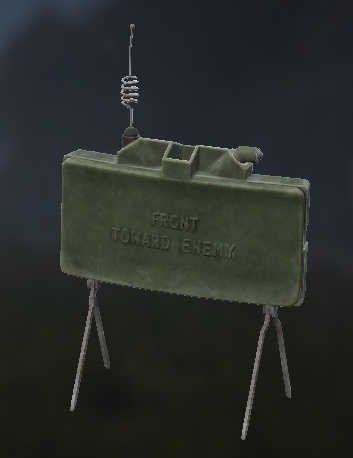
- LODs
- 10
- Vertices
- 6,362
- Faces
- 3,631
- Textures
- 2
- Materials
- 4
- Size (X × Y × Z)
- 0.235 × 0.353 × 0.333 m
CfgModels · ClaymoreMinePlacing — Sections
ODOL Flags 37
Size
Flags
Model
Mass
Map
Bounds
Centers
ByteIndices
Level of Detail 10
1.000 2,824 verts 1,920 faces 1 tex
Named selections (2)
Textures
#(argb,8,8,3)color(0.4,0.4,0.4,0.75,ca)
Materials
dz\weapons\explosives\data\claymore_undeployable.rvmat
Named properties (1)
| Name | Value |
|---|---|
| lodnoshadow | 1 |
2.000 1,927 verts 984 faces 1 tex
Named selections (2)
Textures
dz\weapons\explosives\data\claymore_co.paa
Materials
dz\gear\tools\data\remotedetonator_led.rvmatdz\weapons\explosives\data\claymore.rvmat
Named properties (1)
| Name | Value |
|---|---|
| lodnoshadow | 1 |
3.000 897 verts 405 faces 1 tex
Named selections (2)
Textures
dz\weapons\explosives\data\claymore_co.paa
Materials
dz\gear\tools\data\remotedetonator_led.rvmatdz\weapons\explosives\data\claymore.rvmat
Named properties (1)
| Name | Value |
|---|---|
| lodnoshadow | 1 |
4.000 419 verts 203 faces 1 tex
Named selections (2)
Textures
dz\weapons\explosives\data\claymore_co.paa
Materials
dz\weapons\explosives\data\claymore.rvmat
Named properties (1)
| Name | Value |
|---|---|
| lodnoshadow | 1 |
5.000 226 verts 85 faces 1 tex
Named selections (2)
Textures
dz\weapons\explosives\data\claymore_co.paa
Materials
dz\weapons\explosives\data\claymore.rvmat
Named properties (1)
| Name | Value |
|---|---|
| lodnoshadow | 1 |
6.000 33 verts 10 faces 1 tex
Named selections (2)
Textures
dz\weapons\explosives\data\claymore_co.paa
Materials
dz\weapons\explosives\data\claymore.rvmat
Named properties (1)
| Name | Value |
|---|---|
| lodnoshadow | 1 |
Geometry 8 verts 6 faces 0 tex
Named selections (1)
Named properties (1)
| Name | Value |
|---|---|
| autocenter | 0 |
Memory 12 verts 6 faces 0 tex
Other named selections (6)
View Geometry 8 verts 6 faces 0 tex
Named selections (1)
Fire Geometry 8 verts 6 faces 0 tex
Named selections (1)
Materials
dz\data\data\penetration\plastic.rvmat
model.cfg
class CfgSkeletons
{
	class claymore_mine_placing_skeleton
	{
		IsDiscrete = 1;
		SkeletonInherit = "";
		SkeletonBones[] =
		{
			"inventory", "",
			"placing", ""
		};
	};
};

class CfgModels
{
	class Default
	{
		Sections[] = {};
		SectionsInherit = "";
		SkeletonName = "";
	};
	class ClaymoreMinePlacing: Default
	{
		SkeletonName = "claymore_mine_placing_skeleton";
		Sections[] =
		{
			"placing",
			"inventory"
		};
		class Animations
		{
			class Inventory
			{
				type = "Hide";
				source = "user";
				selection = "inventory";
				minValue = "0";
				maxValue = "1";
				hideValue = "0.01";
			};
			class Placing
			{
				type = "Hide";
				source = "user";
				selection = "placing";
				minValue = "0";
				maxValue = "1";
				hideValue = "0.01";
			};
		};
	};
};
CfgSkeletons · claymore_mine_placing_skeleton 2
| Bone | Parent |
|---|---|
| inventory | — |
| placing | — |
CfgModels · ClaymoreMinePlacing 2
Textures 2
#(argb,8,8,3)color(0.4,0.4,0.4,0.75,ca)dz\weapons\explosives\data\claymore_co.paa
Materials 4
dz\data\data\penetration\plastic.rvmatdz\gear\tools\data\remotedetonator_led.rvmatdz\weapons\explosives\data\claymore.rvmatdz\weapons\explosives\data\claymore_undeployable.rvmat